
1.
자유로운 웹사이트 코드펜 작업링크: https://codepen.io/2417-the-encoder/pen/MYyypYG
a.
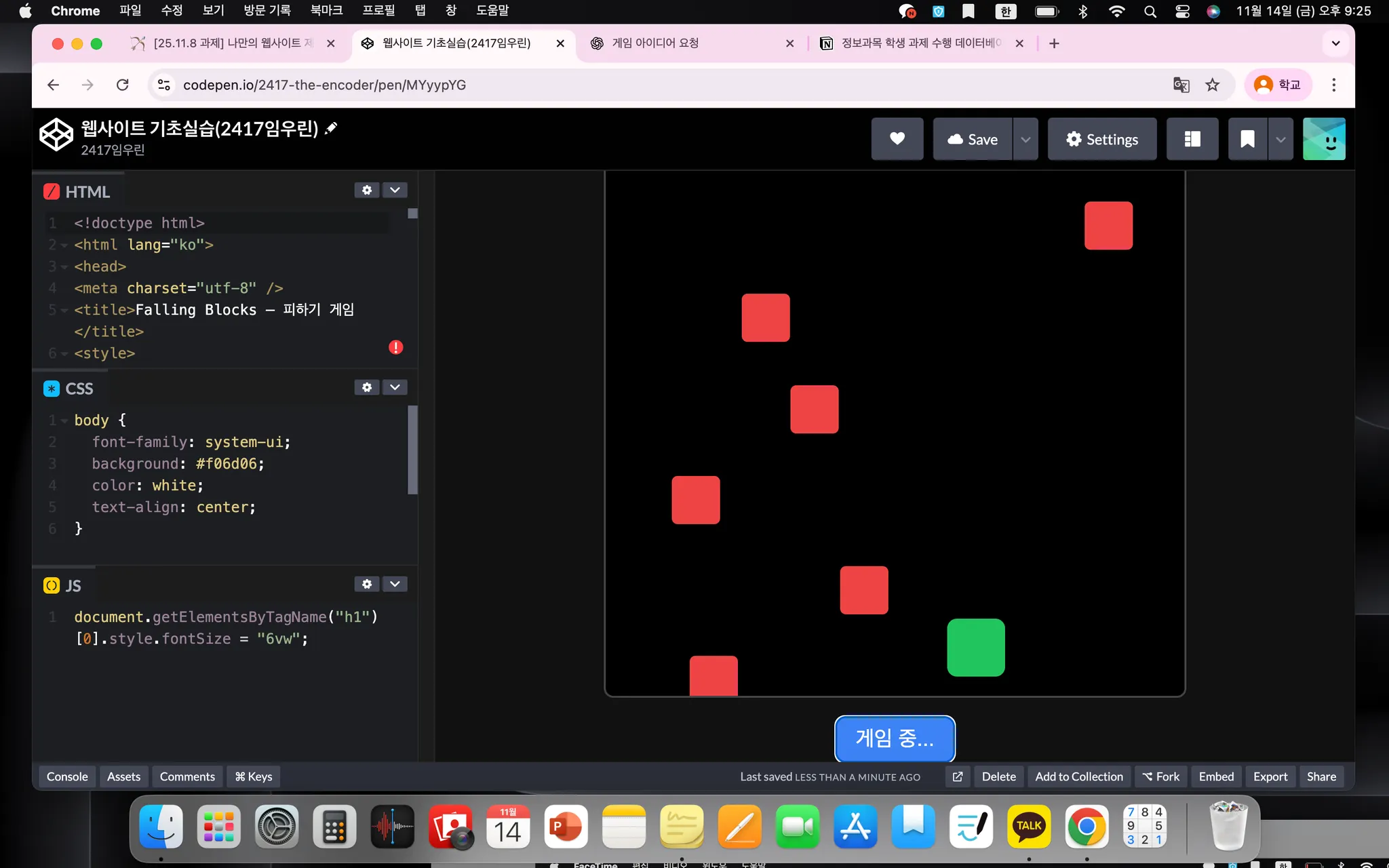
화면 캡처
b.
코드
<!doctype html>
<html lang="ko">
<head>
<meta charset="utf-8" />
<title>Falling Blocks — 피하기 게임</title>
<style>
body{margin:0;background:#111;color:#fff;font-family:Arial;display:flex;align-items:center;justify-content:center;height:100vh;}
#game{position:relative;width:600px;height:700px;background:#000;border:2px solid #444;border-radius:10px;overflow:hidden;}
#player{position:absolute;bottom:20px;left:270px;width:60px;height:60px;background:#22c55e;border-radius:10px;}
.block{position:absolute;top:-50px;width:50px;height:50px;background:#ef4444;border-radius:6px;}
#start{margin-top:20px;font-size:22px;padding:10px 20px;border:none;border-radius:10px;background:#3b82f6;color:white;cursor:pointer;}
#scoreBox{position:absolute;top:10px;left:10px;font-size:20px;}
</style>
</head>
<body>
<div>
<div id="game">
<div id="player"></div>
<div id="scoreBox">점수: <span id="score">0</span></div>
</div>
<button id="start">게임 시작</button>
</div>
<script>
const game = document.getElementById('game');
const player = document.getElementById('player');
const startBtn = document.getElementById('start');
const scoreEl = document.getElementById('score');
let score = 0;
let playing = false;
let speed = 3;
startBtn.addEventListener('click', ()=>{
if(playing) return;
playing = true;
startBtn.disabled = true;
spawnBlock();
});
document.addEventListener('mousemove', e =>{
if(!playing) return;
const rect = game.getBoundingClientRect();
let x = e.clientX - rect.left - 30;
x = Math.max(0, Math.min(540, x));
player.style.left = x + 'px';
});
function spawnBlock(){
if(!playing) return;
const block = document.createElement('div');
block.classList.add('block');
block.style.left = Math.random() * 550 + 'px';
game.appendChild(block);
let y = -50;
function fall(){
if(!playing) return;
y += speed;
block.style.top = y + 'px';
const px = player.offsetLeft;
const bx = block.offsetLeft;
const py = player.offsetTop;
if(Math.abs(px - bx) < 50 && y > py - 50 && y < py + 50){
playing = false;
alert('게임 종료! 점수: ' + score);
location.reload();
return;
}
if(y < 750){
requestAnimationFrame(fall);
} else {
block.remove();
}
}
fall();
score++;
scoreEl.textContent = score;
speed += 0.02;
setTimeout(spawnBlock, 600);
Plain Text
복사
}
</script>
</body>
</html>
c.
간단한 설명
떨어지는 블록을 피하는 게임이다.
2.
ai를 활용한 인식관련된 웹사이트 코드펜 작업링크
a.
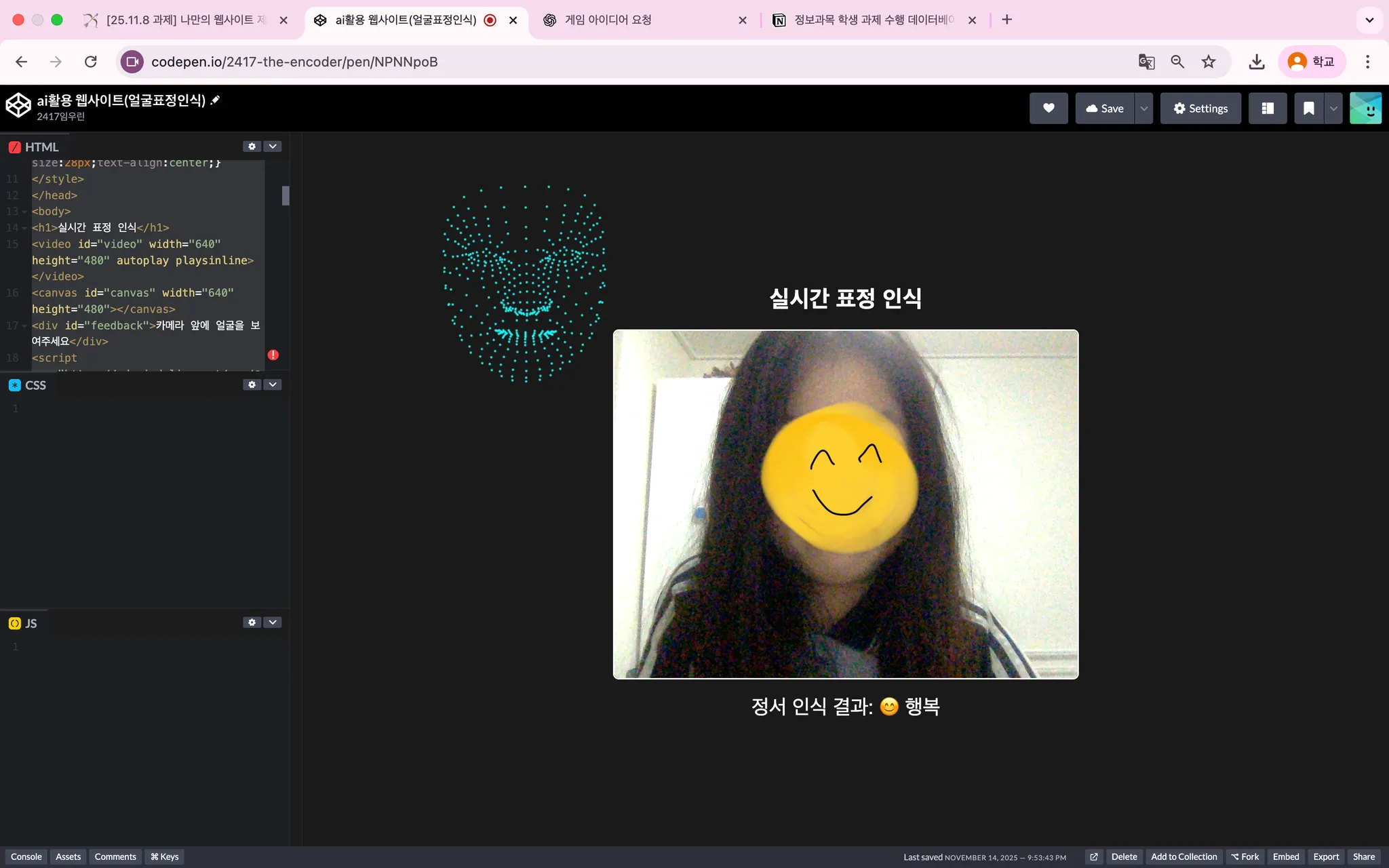
화면 캡처
b.
코드
<!DOCTYPE html>
<html lang="ko">
<head>
<meta charset="UTF-8">
<title>정서 인식 웹 서비스</title>
<style>
body{display:flex;flex-direction:column;align-items:center;justify-content:center;height:100vh;background:#1a1a1a;color:white;font-family:Arial;}
video{border-radius:8px;border:2px solid #fff;transform:scaleX(-1);}
canvas{position:absolute;top:0;left:0;}
#feedback{margin-top:20px;font-size:28px;text-align:center;}
</style>
</head>
<body>
<h1>실시간 표정 인식</h1>
<video id="video" width="640" height="480" autoplay playsinline></video>
<canvas id="canvas" width="640" height="480"></canvas>
<div id="feedback">카메라 앞에 얼굴을 보여주세요</div>
<script src="https://cdn.jsdelivr.net/npm/@mediapipe/face_mesh/face_mesh.js"></script>
<script src="https://cdn.jsdelivr.net/npm/@mediapipe/camera_utils/camera_utils.js"></script>
<script>
const videoElement=document.getElementById('video');
const canvasElement=document.getElementById('canvas');
const canvasCtx=canvasElement.getContext('2d');
const feedbackEl=document.getElementById('feedback');
canvasCtx.translate(canvasElement.width,0);
canvasCtx.scale(-1,1);
function getDistance(a,b){return Math.hypot(a.x-b.x,a.y-b.y);}
function estimateEmotion(landmarks){
const leftMouth=landmarks[61];
const rightMouth=landmarks[291];
const topLip=landmarks[13];
const bottomLip=landmarks[14];
const mouthHeight=getDistance(topLip,bottomLip);
const mouthWidth=getDistance(leftMouth,rightMouth);
const leftCornerDiff=leftMouth.y-bottomLip.y;
const rightCornerDiff=rightMouth.y-bottomLip.y;
// 입 열림 → 무조건 놀람
if(mouthHeight/mouthWidth>0.25){
return ' 놀람';
}
놀람';
}
놀람';
}// 기존 입꼬리 기반 감정 유지
if(leftCornerDiff<0 && rightCornerDiff<0){
return ' 행복';
} else if(leftCornerDiff>0 && rightCornerDiff>0){
return ' 슬픔';
} else {
return ' 중립';
}
}
행복';
} else if(leftCornerDiff>0 && rightCornerDiff>0){
return ' 슬픔';
} else {
return ' 중립';
}
}const recentEmotions=[];
function smoothEmotion(emotion){
recentEmotions.push(emotion);
if(recentEmotions.length>15) recentEmotions.shift();
const counts={};
for(const e of recentEmotions){counts[e]=(counts[e]||0)+1;}
return Object.entries(counts).sort((a,b)=>b[1]-a[1])[0][0];
}
const faceMesh=new FaceMesh({locateFile:file=>https://cdn.jsdelivr.net/npm/@mediapipe/face_mesh/${file}});
faceMesh.setOptions({maxNumFaces:1,refineLandmarks:true,minDetectionConfidence:0.7,minTrackingConfidence:0.7});
faceMesh.onResults(results=>{
canvasCtx.save();
canvasCtx.clearRect(0,0,canvasElement.width,canvasElement.height);
if(results.multiFaceLandmarks&&results.multiFaceLandmarks.length>0){
const landmarks=results.multiFaceLandmarks[0];
for(const point of landmarks){
canvasCtx.beginPath();
canvasCtx.arc(point.xcanvasElement.width,point.ycanvasElement.height,1.5,0,2*Math.PI);
canvasCtx.fillStyle='aqua';
canvasCtx.fill();
}
const emotion=smoothEmotion(estimateEmotion(landmarks));
feedbackEl.textContent=정서 인식 결과: ${emotion};
} else feedbackEl.textContent='카메라 앞에 얼굴을 보여주세요';
canvasCtx.restore();
});
const camera=new Camera(videoElement,{onFrame:async()=>{await faceMesh.send({image:videoElement});},width:640,height:480});
camera.start();
</script>
</body>
</html>
c.
간단한 설명
표정에 따라 행복, 슬픔, 놀람, 중립을 인식한다.